
Turtl Partner API
Version v1. Server-side integration only.
Property-photo editing APIs for enterprise listing workflows.
Use Turtl to add listing photo polish, Room Reset, async gallery jobs, signed webhooks, and usage reporting inside a property-management app. The API is built for partner servers, not browser clients.
Base URL
turtledit.com
Auth
Bearer key
Model
Async jobs
 Original
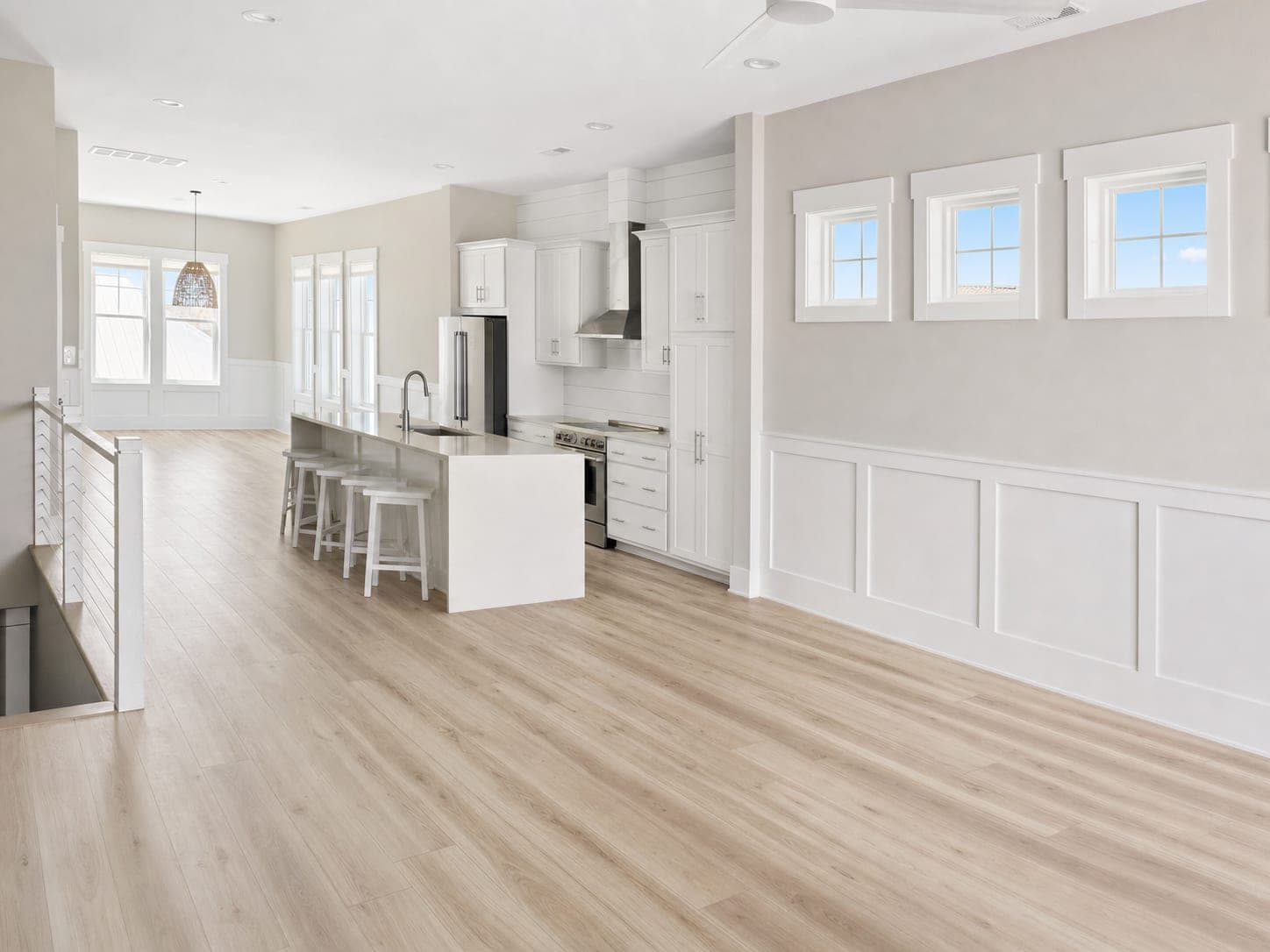 Room Reset
Reference integration
Turtl Properties uses this API to review listing photos, polish the recommended hero, upsell the full gallery, and run Room Reset on tenant-selected rooms.
Overview
What the Partner API does
The Partner API is separate from the consumer editor. It uses scoped API keys, idempotency keys, tenant-scoped jobs, private stored source images, short-lived result URLs, signed webhooks, and usage records. A property-management partner can keep the landlord workflow in its own product while Turtl handles the image-editing work.
Listing Photo Polish
Improve light, color, perspective, clarity, and listing presentation while keeping the same home intact.
Room Reset
Remove movable furniture, freestanding decor, loose personal items, and clutter while preserving architecture and permanent fixtures.
Gallery Workflows
Create upload URLs, submit up to 25 images per job, poll status, and place signed result URLs back into the partner listing flow.
Operations Hooks
Use signed webhooks, idempotency keys, usage metering, retention controls, and scoped credentials for enterprise operation.
Getting Started
Account registration and credentials
Enterprise access is invitation-based during the pilot. A Turtl admin creates the partner account, issues credentials, and configures webhooks from Partner Admin. The tenant stores those credentials server-side and calls the API from its backend.
- 1Turtl creates a partner account for the tenant and assigns a slug, retention window, and billing settings.
- 2An admin creates a named API key in Partner Admin. Plaintext is shown once; Turtl stores only the prefix, last four characters, and SHA-256 hash.
- 3The tenant stores the key in a server-side secret such as TURTL_PARTNER_API_KEY. Browser code never receives the key.
- 4Optional webhook endpoints are added with event subscriptions. Webhook secrets are also shown once and stored by the tenant.
- 5The tenant starts in a staging or demo workflow, then rotates to production credentials before launch.
TURTL_API_BASE_URL="https://turtledit.com"
TURTL_PARTNER_API_KEY="turtl_partner_pk..._..."
TURTL_WEBHOOK_SECRET="whsec_..."The partner API key is a server secret. Turtl Properties mirrors the expected production pattern: the browser uploads to the partner app, and the partner server calls Turtl with the stored key.
Reference Flow
How Turtl Properties uses the API
Review the listing photos inside the PMS
The Turtl Properties demo scores photos, recommends a hero, suggests gallery order, and flags Room Reset candidates before sending work to Turtl.
Send only selected work to Turtl
The partner server uploads source bytes or passes source URLs, then creates jobs with property metadata and idempotency keys.
Show progress in the listing workflow
The app polls job status and can also receive signed webhooks for job.completed, job.failed, and job.canceled.
Return results to the landlord
Completed images include short-lived signed result URLs. The demo places polished and Room Reset variants back into final listing review.
Position Turtl as the photo-processing layer that can sit behind a TurboTenant-style listing flow. The partner keeps its native landlord UX, pricing, and syndication logic; Turtl returns improved listing assets with job status, disclosure flags, and usage records.
Authentication
Bearer keys, scopes, and idempotency
Send the API key in the Authorization header. New job creation should include anIdempotency-Key header so retries do not create duplicate billable work.
curl -H "Authorization: Bearer $TURTL_PARTNER_API_KEY" \
  "https://turtledit.com/api/v1/partner/usage?start=2026-06-01T00:00:00.000Z&end=2026-07-01T00:00:00.000Z"
Recommended scopes
uploads:create, jobs:create, jobs:read, jobs:cancel, jobs:delete, usage:read, webhooks:test
Rate limit
120 authenticated partner requests per minute per API-key prefix.
Rotation
Create a replacement key, deploy the new secret, then revoke the old key ID.
Reference
Endpoint map
| Method | Path | Purpose | Access |
|---|---|---|---|
| POST | /api/v1/partner/polish | Create one listing-polish job from one photo. | jobs:create |
| POST | /api/v1/partner/room-reset | Create one Room Reset job from one photo. | jobs:create |
| POST | /api/v1/partner/upload-urls | Create one-time upload URLs for source images. | uploads:create |
| PUT | /api/v1/partner/uploads/:token | Upload source bytes to a one-time URL. | Upload token |
| POST | /api/v1/partner/jobs | Create an async batch job with one to 25 images. | jobs:create |
| GET | /api/v1/partner/jobs/:jobId | Poll job, image, usage, and result URL status. | jobs:read |
| POST | /api/v1/partner/jobs/:jobId/cancel | Cancel queued or in-progress work when possible. | jobs:cancel |
| DELETE | /api/v1/partner/jobs/:jobId | Delete retained job image data and stored bytes. | jobs:delete |
| GET | /api/v1/partner/results/:token | Download short-lived private result bytes. | Signed token |
| GET | /api/v1/partner/usage | Read usage and billing estimates for a date range. | usage:read |
| POST | /api/v1/partner/webhooks/test | Send a signed test event to active endpoints. | webhooks:test |
Single Photo
Polish or Room Reset one image
Use the simple endpoints when the partner wants exactly one photo and the edit type is chosen by the URL. Both return async jobs, so the UI can poll or wait for webhooks.
Listing Photo Polish
Improves presentation while keeping the same room, furnishings, fixtures, finishes, views, scale, and property condition.
curl -X POST https://turtledit.com/api/v1/partner/polish \
  -H "Authorization: Bearer $TURTL_PARTNER_API_KEY" \
  -H "Idempotency-Key: tt-listing-456-cover-polish-v1" \
  -F "photo=@living-room.jpg;type=image/jpeg" \
  -F "externalJobId=tt-listing-456-cover-polish" \
  -F "externalImageId=cover_1" \
  -F "role=cover" \
  -F "roomType=living_room"
Room Reset
Removes movable items and clutter while preserving structure, built-ins, appliances, views, scale, and material condition.
curl -X POST https://turtledit.com/api/v1/partner/room-reset \
  -H "Authorization: Bearer $TURTL_PARTNER_API_KEY" \
  -H "Idempotency-Key: tt-listing-456-bedroom-reset-v1" \
  -H "content-type: application/json" \
  -d '{
    "externalJobId": "tt-listing-456-bedroom-reset",
    "roomType": "bedroom",
    "image": {
      "externalImageId": "bedroom_1",
      "sourceUrl": "https://partner-cdn.example/listings/456/bedroom.jpg",
      "contentType": "image/jpeg"
    },
    "instructions": "Remove the bed, nightstands, lamps, rug, and freestanding bookcase. Keep the windows, closet doors, flooring, and built-in fixtures."
  }'
Batch Jobs
Process a listing gallery
The gallery flow starts with one-time upload URLs, then creates a job with the returnedsourceObjectKey values. This is the path Turtl Properties uses for hero polish and full-gallery upgrades.
Create upload URLs
Send filenames, content types, and optional byte sizes for each source image.
PUT source bytes
Upload each original file to its one-time URL within the expiration window.
Create the job
Attach property metadata, edit profile, image roles, and an idempotency key.
Poll or receive webhooks
Use job status to update the listing UI and collect signed result URLs.
curl -X POST https://turtledit.com/api/v1/partner/upload-urls \
  -H "Authorization: Bearer $TURTL_PARTNER_API_KEY" \
  -H "content-type: application/json" \
  -d '{
    "files": [
      { "filename": "kitchen.jpg", "contentType": "image/jpeg", "byteSize": 1845000 },
      { "filename": "bedroom.HEIC", "contentType": "image/heic", "byteSize": 2104000 }
    ]
}'curl -X POST https://turtledit.com/api/v1/partner/jobs \
-H "Authorization: Bearer $TURTL_PARTNER_API_KEY" \
-H "Idempotency-Key: tt-listing-456-gallery-polish-v1" \
-H "content-type: application/json" \
-d '{
"externalJobId": "tt-listing-456-gallery-polish",
"property": {
"externalPropertyId": "prop_987",
"listingId": "listing_456",
"unitId": "unit_12",
"address": { "city": "Fort Collins", "state": "CO", "country": "US" },
"propertyType": "rental"
},
"editProfile": {
"mode": "listing_polish",
"quality": "standard",
"roomType": "auto",
"truthfulnessPolicy": "preserve_structure",
"allowVirtualStaging": false,
"instructions": "Make this rental listing gallery brighter, cleaner, and ready for syndication while preserving the real rooms."
},
"images": [
{
"externalImageId": "kitchen_1",
"role": "cover",
"sourceObjectKey": "partner/.../uploads/...",
"contentType": "image/jpeg"
}
],
"metadata": {
"integration": "turtl-properties-demo"
}
}'Responses
Statuses, result URLs, and disclosure fields
New jobs return 202 Accepted. Duplicate idempotency keys return the existing job with Idempotent-Replay: true. Completed images include signed result URLs that expire and should be copied into the partner's own durable storage if needed.
queued
The job or image is accepted and waiting for processing.
processing
Turtl is normalizing the source image and creating the edit.
completed
All expected outputs are ready. Image records include signed result URLs.
failed
Processing failed after retry attempts or a non-retryable source issue.
canceled
Queued work was canceled before completion.
deleted
Retained job data and stored bytes were deleted.
{
  "jobId": "job_01hy...",
  "status": "completed",
  "externalJobId": "tt-listing-456-gallery-polish",
  "createdAt": "2026-06-23T18:00:00.000Z",
  "completedAt": "2026-06-23T18:02:31.000Z",
  "usage": {
    "processedImages": 1,
    "billableImages": 1,
    "estimatedModelCostCents": 12,
    "serviceMarginCents": 50,
    "billableCents": 62
  },
  "images": [
    {
      "imageId": "img_01hy...",
      "externalImageId": "kitchen_1",
      "role": "cover",
      "status": "completed",
      "materiallyAltered": false,
      "virtuallyStaged": false,
      "disclosureLabel": null,
      "resultUrl": "https://turtledit.com/api/v1/partner/results/...",
      "resultUrlExpiresAt": "2026-06-23T19:02:31.000Z"
    }
  ]
}
Webhooks
Signed delivery events
Configure active endpoints in Partner Admin for job.completed,job.failed, and job.canceled. Turtl signs the exact raw body using HMAC-SHA256 and sends event ID, timestamp, and signature headers.
Headers
Turtl-Event-Id, Turtl-Timestamp, Turtl-Signature
Signature
v1=<hex hmac> over timestamp.rawBody
Reliability
Webhook deliveries retry with backoff and should be de-duplicated by event ID.
const expected = createHmac("sha256", webhookSecret)
  .update(timestamp + "." + rawBody)
  .digest("hex")

const valid = timingSafeEqual(
  Buffer.from(signature.replace(/^v1=/, ""), "hex"),
  Buffer.from(expected, "hex")
)
Usage
Metering, retention, and operations
Usage returns processed image counts, failed images, retry events, model-cost estimate, service margin, metered billable amount, monthly minimum, and final billable amount. Partner retention settings determine how long source and result bytes are retained before deletion.
curl -H "Authorization: Bearer $TURTL_PARTNER_API_KEY" \
  "https://turtledit.com/api/v1/partner/usage?start=2026-06-01T00:00:00.000Z&end=2026-07-01T00:00:00.000Z"
Tenant isolation
Jobs, objects, usage events, webhooks, and API keys are scoped to a partner account.
Private results
Result URLs are signed and short-lived. Partner apps can copy final assets into their own listing media store.
Async by default
Image work is queued and processed outside the request path so the listing app can stay responsive.
Trust
Truthful listing policy
Turtl improves the photo, not the facts of the home. Default listing polish preserves structure, layout, fixtures, views, room size, and material condition. Room Reset removes movable items and should keep originals available for MLS-sensitive workflows.
Good fit
- Exposure, color, perspective, and clarity cleanup.
- Room Reset for movable furniture, loose decor, and clutter.
- Gallery consistency before syndication.
- Virtual staging only when the partner workflow can disclose it.
Avoid
- Changing room size, layout, windows, doors, fixtures, or views.
- Hiding material defects or permanent negative conditions.
- Presenting virtual staging or Room Reset as unedited reality.
- Sending API keys to browser clients or mobile apps.
Admin-only implementation docs live at /admin/partners/docs. The source repo also includes docs/partner-api.md anddocs/enterprise-operations-runbook.md.
Ready for a tenant demo
Show the workflow first, then the API contract.
Use Turtl Properties to prove the booking and listing-photo flow, then send this page as the external documentation artifact for their engineering team.